I’ve been using Cloudflare for over a year, and suddenly I want to record some of the pleasures and pains I’ve experienced. For simplicity, Cloudflare will be referred to as CF in the following content.
1. com Domain
Comparing some common domestic and international domain registrars, I found that purchasing long-term (5/10+ years) .com domains from CF is cheap and worry-free. I don’t know why, but I rarely see people mentioning this part. Most introductions focus on how cheap short-term domains are from certain registrars, like only a few cents per year or one or two dollars per year, while cleverly avoiding the high renewal prices of these low-cost domains. You only see the renewal price when you click on the renewal option, but by then you’ve already registered. This common marketing strategy is active in various occasions. Compared with domestic domain providers like Wanwang, CF has many advantages, and it also offers many free custom domain services. In terms of functionality, it simply crushes many providers. However, once you use the internet, you still have to face the constraints and restrictions of your ISP. CF has thought of this too, and for individual users, it also provides a free CDN service, which is almost like a bodhisattva act. But you still need to be cautious, as I will discuss later.
2. Tunnel
CF tunnel is a relatively popular feature, addressing the shortage of IPv4 and the mapping of lab services in recent years. Individual users only need to register a CF account, have an internal network that can connect to the internet, and have a domain bound to CF’s DNS service. By configuring a tunnel, you can directly access your internal network services from the public internet. CF additionally provides a free quota of CDN acceleration, directly disrupting the market of NPS/FRP. Tailscale funnel, as a rising star, has also been caught off guard. With the development of firewall technology, NPS/FRP/Zerotier have been included in strict regulatory restriction lists by many security companies. Once enabled, security personnel will immediately come to you. The open-source project cloudflare-tunnel-ingress-controller can directly expose internal k8s services to the public internet. However, it currently leans more towards deployment services, and support for headless statefulset service mapping is still limited. If you want, you can use docker-compose with CF tunnel to achieve this part, as introduced by CF officially. Alternatively, you can use cloudflare-operator.
For the docker-compose version of CF configuration, there is one thing to note. By default, CF tunnel uses the QUIC protocol, but the stability of this protocol is worse than HTTP2 in practice. The specific phenomenon is that if you use CF tunnel to map your internal blog to a public domain, the public domain of the blog often cannot be opened with QUIC, while HTTP2 is relatively much more stable. There are many related posts on the CF forum; you can check them out if interested.
command: "tunnel --protocol http2 run"So the question is, CF tunnel is so powerful and provides a free CDN quota, doesn’t it have any drawbacks?
I discovered this later during a network inspection. To reduce the number of personal subdomains and lower maintenance effort and cost, I used nmap to check my CF tunnel service and found that it directly exposes other services on the same host as the CF tunnel service to the public internet. If you want to strictly implement cloud WAF restrictions for this part, sorry, that part is not free.
Also, for mapping your local internal HTTPS service to the public internet, you need to enable the TLS/No TLS Verify option to use it. By default, No TLS Verify is disabled.
If you use tunnel to map a local internal HTTP service, CF automatically provides a free, seamless HTTPS certificate service. However, all your request content will be displayed in plaintext on their servers, which is very dangerous.
3. WARP
Another popular feature is CF WARP. Many developers have used the WARP mechanism to create unlimited free proxy services. CF’s official response to these phenomena has been tacit approval. I have great doubts about this feature, but I can’t help but admire its robustness. Currently, I don’t plan to use it because I have no need.
4. Worker
CF also has a very powerful worker feature, which is really useful. Occasionally, when rewriting some AI proxy services, it performs excellently. Besides that, there are other uses. For example, due to regional restrictions, access to Docker Hub has been tightened, and many CF worker Docker Hub projects have revived. Many contents are similar, so to verify whether these new methods work well, I did some tests and found many drawbacks. Specifically, it’s about using CF worker to build a mirror acceleration service for Docker images, aiming to pull images without network obstruction and at a decent speed. This part will be referred to as Docker proxy.
4.1 Worker Forwarding
4.1.1 First Method
GitHub - ciiiii/cloudflare-docker-proxy: A docker registry proxy run on cloudflare worker.
GitHub - ImSingee/hammal: docker-registry proxy run in cloudflare workers
4.1.2 Supplement
GitHub - dqzboy/Docker-Proxy-Image Acceleration/Management Service. Supports deployment to Render
The first method is to forward and rewrite the original image repository name via CF worker. Suppose you have a domain test123.com.
const routes = {
  ***
   "docker.test123.com": "https://registry-1.docker.io",
  "quay.test123.com": "https://quay.io",
  "gcr.test123.com": "https://gcr.io",
  "k8s-gcr.test123.com": "https://k8s.gcr.io",
  "k8s.test123.com": "https://registry.k8s.io",
  "ghcr.test123.com": "https://ghcr.io",
  ***
};
Fork the project, then follow the tutorial to configure the relevant CF worker API token and account ID. The process is quite simple.
Then configure CF’s private DNS resolution, modify the domain mapping information of the const routes forked on GitHub. Everything is smooth.
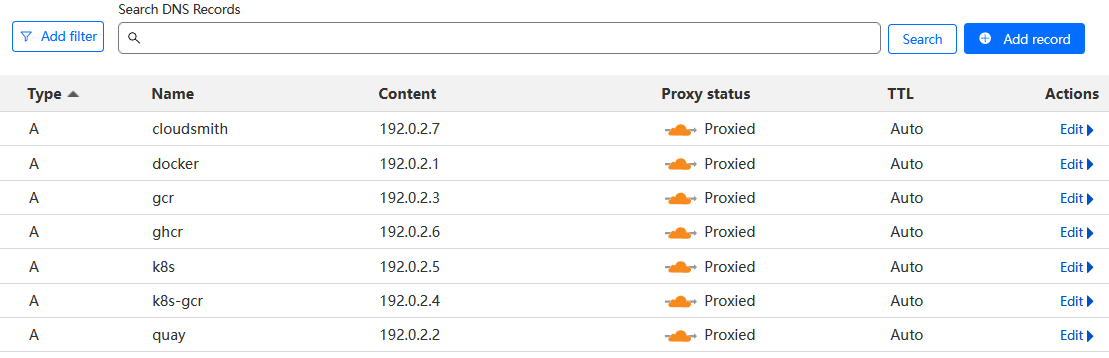
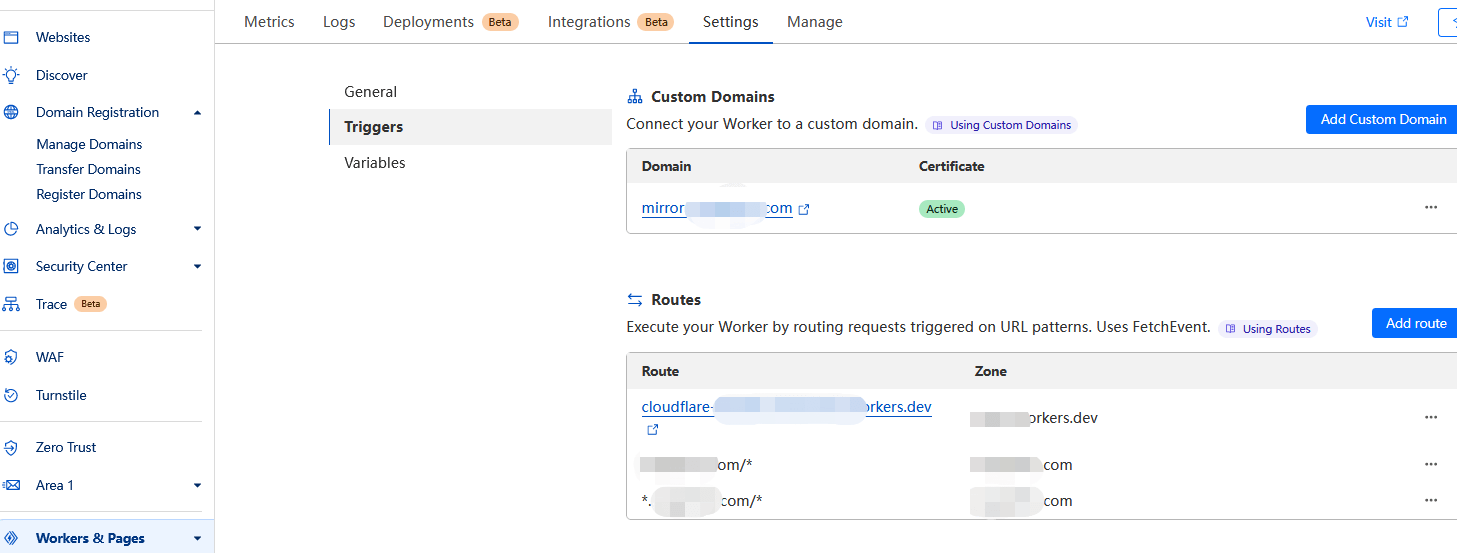
In addition, you need to modify the local /etc/docker/daemon.json on the host, add the configuration to replace registry-mirrors, and finally reload the relevant services. In a production network, restarting docker arbitrarily is not allowed.
Continue testing. To ensure the validity of the test, all third-party public sources were removed.
Before modifying docker proxy
## Original source configuration: "registry-mirrors": ["https://dockerhub.azk8s.cn", "https://docker.mirrors.ustc.edu.cn"],

root@test123:~# docker pull grafana/grafana:8.3.1
Pulling from grafana/grafana
error pulling image configuration: download failed after attempts=6: dial tcp 162.125.7.1:443: i/o timeout
Remove third-party sources, only use custom domain sources forwarded by CF Worker
To save space and highlight key points, some log prints have been removed, such as more repeated pull processes and detailed pull prints. This does not affect the actual test results.
First, test grafana
It was found that grafana can be pulled normally whether using the original repo or the custom domain repo.
root@test123:~# docker pull  docker.test123.com/grafana/grafana:8.3.1
Pulling from grafana/grafana
Digest: sha256:259b847ed7e3f58e6056438fd3bc353f48fbe9b77ed3b204ae619ba80e10aed9
Status: Downloaded newer image for docker.test123.com/grafana/grafana:8.3.1
docker.test123.com/grafana/grafana:8.3.1


root@test123:~# docker pull  grafana/grafana:8.3.1
Pulling from grafana/grafana
Digest: sha256:259b847ed7e3f58e6056438fd3bc353f48fbe9b77ed3b204ae619ba80e10aed9
Status: Downloaded newer image for grafana/grafana:8.3.1

root@test123:~# docker images|grep grafana
grafana/grafana                                                                     latest                  f9095e2f0444   4 weeks ago     443MB
grafana/grafana                                                                     <none>                  0aa9adb9f6ef   12 months ago   309MB
grafana/grafana                                                                     8.3.1                   3b1fc05e7c9a   2 years ago     275MB
root@test123:~#

root@test123:~# docker rmi 3b1fc05e7c9a   0aa9adb9f6ef    f9095e2f0444
root@test123:~# docker pull  grafana/grafana:8.3.1
Pulling from grafana/grafana
error pulling image configuration: download failed after attempts=6: dial tcp 80.87.199.46:443: i/o timeout

root@test123:~# docker pull  grafana/grafana:8.3.1
Pulling from grafana/grafana
Digest: sha256:259b847ed7e3f58e6056438fd3bc353f48fbe9b77ed3b204ae619ba80e10aed9
Status: Downloaded newer image for grafana/grafana:8.3.1
root@test123:~#
I wanted to see if I could pull k8s images, since k8s is the most used, but found it’s not possible. Most k8s images are not proxied by default custom source domains; directly pulling the original image repos:tags doesn’t work.
root@test123:~# docker pull k8s.gcr.io/pause:3.2
root@test123:~# docker pull k8s.gcr.io/pause:3.2
Error response from daemon: Get "https://k8s.gcr.io/v2/": net/http: request canceled while waiting for connection (Client.Timeout exceeded while awaiting headers)
root@test123:~#
root@test123:~# docker pull registry.k8s.io/ingress-nginx/controller:v1.3.0
Error response from daemon: Head "https://us-west2-docker.pkg.dev/v2/k8s-artifacts-prod/images/ingress-nginx/controller/manifests/v1.3.0": dial tcp 142.250.141.82:443: i/o timeout
root@test123:~#
root@test123:~# docker pull registry.k8s.io/ingress-nginx/controller:v1.3.0
Error response from daemon: Head "https://us-west2-docker.pkg.dev/v2/k8s-artifacts-prod/images/ingress-nginx/controller/manifests/v1.3.0": dial tcp 74.125.137.82:443: i/o timeout
root@test123:~#
root@test123:~#
Source image k8s.gcr.io/prometheus-adapter/prometheus-adapter:v0.9.1, during repeated test executions, most attempts fail, there is a success rate, availability has become a problem.
root@test123:~#
root@test123:~# docker pull k8s.gcr.io/prometheus-adapter/prometheus-adapter:v0.9.1
Error response from daemon: Get "https://k8s.gcr.io/v2/": net/http: request canceled while waiting for connection (Client.Timeout exceeded while awaiting headers)

root@test123:~#
root@test123:~# docker pull k8s-gcr.test123.com/prometheus-adapter/prometheus-adapter:v0.9.1
Error response from daemon: error parsing HTTP 404 response body: no error details found in HTTP response body: "{\"routes\":{\"docker.test123.com\":\"https://registry-1.docker.io\",\"quay.test123.com/*\":\"https://quay.io\",\"gcr.test123.com/*\":\"https://gcr.io\",\"k8s-gcr.test123.com/*\":\"https://k8s.gcr.io\",\"k8s.test123.com/*\":\"https://registry.k8s.io\",\"ghcr.test123.com/*\":\"https://ghcr.io\",\"cloudsmith.test123.com/*\":\"https://docker.cloudsmith.io\"}}"

root@test123:~#
root@test123:~# docker pull k8s-gcr.test123.com/prometheus-adapter/prometheus-adapter:v0.9.1
Pulling from prometheus-adapter/prometheus-adapter
error pulling image configuration: download failed after attempts=1: unauthorized: authentication required
root@test123:~#
root@test123:~# docker pull k8s-gcr.test123.com/prometheus-adapter/prometheus-adapter:v0.9.1
Error response from daemon: Head "https://k8s-gcr.test123.com/v2/prometheus-adapter/prometheus-adapter/manifests/v0.9.1": unable to decode token response: invalid character '<' looking for beginning of value
root@test123:~#

root@test123:~# docker pull k8s-gcr.test123.com/library/prometheus-adapter/prometheus-adapter:v0.9.1
Error response from daemon: Head "https://k8s-gcr.test123.com/v2/library/prometheus-adapter/prometheus-adapter/manifests/v0.9.1": unable to decode token response: EOF
root@test123:~# docker pull k8s-gcr.test123.com/prometheus-adapter/prometheus-adapter:v0.9.1
Pulling from prometheus-adapter/prometheus-adapter
Digest: sha256:d025d1a109234c28b4a97f5d35d759943124be8885a5bce22a91363025304e9d
Status: Downloaded newer image for k8s-gcr.test123.com/prometheus-adapter/prometheus-adapter:v0.9.1
k8s-gcr.test123.com/prometheus-adapter/prometheus-adapter:v0.9.1
root@test123:~#
Source image quay.io/external_storage/nfs-client-provisioner:v3.1.0-k8s1.11
This image was tested and can still be accessed from normal domestic Docker sources, so it is not representative.
root@test123:~# docker pull quay.io/external_storage/nfs-client-provisioner:v3.1.0-k8s1.11
v3.1.0-k8s1.11: Pulling from external_storage/nfs-client-provisioner
Digest: sha256:cdbccbf53d100b36eae744c1cb07be3d0d22a8e64bb038b7a3808dd29c174661
Status: Downloaded newer image for quay.io/external_storage/nfs-client-provisioner:v3.1.0-k8s1.11
quay.io/external_storage/nfs-client-provisioner:v3.1.0-k8s1.11
root@test123:~#
Source image k8s.gcr.io/kube-scheduler:v1.19.13, this one cannot be downloaded successfully.
root@test123:~# docker pull k8s-gcr.test123.com/kube-scheduler:v1.19.13
Error response from daemon: Head "https://k8s-gcr.test123.com/v2/kube-scheduler/manifests/v1.19.13": unable to decode token response: EOF
root@test123:~#
root@test123:~# docker pull k8s-gcr.test123.com/kube-scheduler:v1.19.13
v1.19.13: Pulling from kube-scheduler
error pulling image configuration: download failed after attempts=1: unauthorized: authentication required
root@test123:~#
root@test123:~# docker pull k8s-gcr.test123.com/kube-scheduler:v1.19.13
Error response from daemon: unauthorized: No valid credential was supplied.
root@test123:~#
root@test123:~# docker pull k8s-gcr.test123.com/kube-scheduler:v1.19.13
Error response from daemon: Head "https://k8s-gcr.test123.com/v2/kube-scheduler/manifests/v1.19.13": unable to decode token response: invalid character '<' looking for beginning of value
root@test123:~#
root@test123:~# docker pull k8s-gcr.test123.com/kube-scheduler:v1.19.13
v1.19.13: Pulling from kube-scheduler
unauthorized: No valid credential was supplied.
root@test123:~#
root@test123:~# docker pull k8s-gcr.test123.com/kube-scheduler:v1.19.13
v1.19.13: Pulling from kube-scheduler
error pulling image configuration: download failed after attempts=1: unauthorized: authentication required
root@test123:~#
root@test123:~# docker pull k8s-gcr.test123.com/kube-scheduler:v1.19.13
v1.19.13: Pulling from kube-scheduler
error pulling image configuration: download failed after attempts=1: unauthorized: authentication required
root@test123:~#
The source image k8s.gcr.io/pause:3.4.1, after CF forwarding, the success rate is still very low, and availability has become a problem.
root@test123:~# docker pull k8s.gcr.io/pause:3.4.1
Error response from daemon: Get "https://k8s.gcr.io/v2/": net/http: request canceled while waiting for connection (Client.Timeout exceeded while awaiting headers)
root@test123:~#
root@test123:~# docker pull k8s-gcr.test123.com/pause:3.4.1
Error response from daemon: Head "https://k8s-gcr.test123.com/v2/pause/manifests/3.4.1": unable to decode token response: EOF
root@test123:~#
root@test123:~# docker pull k8s-gcr.test123.com/pause:3.4.1
3.4.1: Pulling from pause
Digest: sha256:6c3835cab3980f11b83277305d0d736051c32b17606f5ec59f1dda67c9ba3810
Status: Downloaded newer image for k8s-gcr.test123.com/pause:3.4.1
k8s-gcr.test123.com/pause:3.4.1
root@test123:~#
root@test123:~#
4.2 Summary
The principles of the first type of Docker proxy are similar, forwarding through CF workers, with differences only in CF configuration handling. In fact, after some testing, it was found that some domain-proxied image names are unusable.
Many open-source business images for k8s have their own domain image registries, requiring CF domain proxies to add additional domain mappings for different categories of repos:tags, which becomes very troublesome when actually used.
You need to identify the repos issue of the source image.
const routes = {
  ***
  "docker.test123.com": dockerHub,
  "quay.test123.com": "https://quay.io",
  "gcr.test123.com": "https://gcr.io",
  "k8s-gcr.test123.com": "https://k8s.gcr.io",
  ****
Another issue is that major vendors impose various security restrictions on origin servers, such as nginx header injection vulnerabilities. As in the above problem, using a different hosts to request your API directly results in an unauthorized error.
Pulling the original source repos:tags works fine.
A third drawback: after about 20-30 local pulls for testing, the interface request count reached around 2.4k. CF’s free tier limit is 100,000 requests per day.
If you use CF Pages for a blog and have other projects on CF, the free quota becomes tight for a single user. Moreover, currently using CF worker for Docker image acceleration, aside from stability, usability still needs improvement.
Isn’t transparent proxy a better solution for Docker, such as bash remote_pull_docker_img.sh pull.txt?
You just edit the target images in the pull.txt file and execute a single bash command. Maintenance portability and economic cost are minimal, and stability is strong. There are many other methods.
For other machines on the intranet to pull, simply connect to this remote and execute the operation, with no invasiveness at all—this is really important.
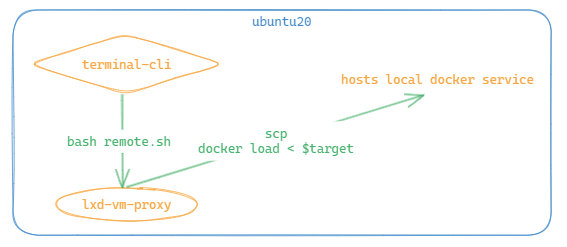
The supplementary part of the second category is unrelated to CF workers, mainly for comparison. If you already have AWS or Azure machines, this option is more flexible. For personal use, resource consumption and load are concerns; a machine with 1 core, 1GB RAM, 20GB disk cannot sustain your service, and upgrading requires further consideration. If the company pays for the server, that’s another story.
Workers have many other features, such as AI/LLM API usage, which are also powerful. Due to various pricing limits, I rarely use them personally.
It is thanks to these open-source community bloggers that many different ideas stimulate brain synapses, greatly aiding both work and life. Brainstorming is essential.
V. Pages
There is much to discuss about this content. CF Pages is really easy to use. Its main advantage is the free tier with sufficient CDN acceleration, which is quite powerful. Compared to GitHub Pages, which suffers from DNS pollution and slow page loading, CF Pages offers many free optimizations. Besides blogs, there are many other static pages combined with its free R2/S3 bucket interfaces waiting to be explored. What are its downsides? For example, if you plan to run a blog long-term, considering data hosting and commercialization, self-hosted WordPress might be better. Also, crawlers probably love CF Pages because scraping is extremely easy. Even facing malicious requests that refresh access counts, the free quota could generate a huge personal bill. Many cloud WAF restriction features are not free. If you just write a static blog without much tinkering, CF Pages is currently the best choice. It must be said that for most individual users, WordPress is still too heavy. Maintaining it involves more than just writing blogs—applying security patches, customizing display panels for multiple clients, selecting suitable business plugins, and considering future migration and backup. Even optimizing multi-client page display alone can take a lot of time. Following the trend, if CF one day charges or follows Google in shutting down unprofitable projects, migration must be considered. So prepare a migration plan in advance. However, as long as the domain is yours, you can always find your way back. Future problems can be dealt with later.
VI. Email Routing
This is quite confusing. You can use CF’s service to customize your email domain. For example, if you have an email and a domain test123.com, you can customize your preferred domain like [email protected].
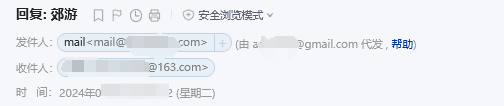
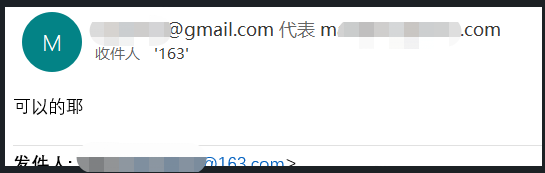
But the problem is that CF explicitly states it only forwards emails and does not provide POP/IMAP sending services. Understandably, this involves many legal risks, and this business is sensitive. If you configure its routing feature, it is essentially half-functional. External parties can freely send emails to [email protected], but when [email protected] replies, the recipient will see a notice that the email was sent on behalf of xx, which looks ugly. The current solution is to use third-party sending services to configure sending. The overall configuration process is quite cumbersome.
7. Afterword
CF is, after all, a commercial company. Many of its impressive free services may use your content data for business analysis behind the scenes. At least for simple use, it is still very powerful and quite generous. Many services come with free quotas; if you don’t add credit card payment information, they cannot be used, and charges only apply after the free quota is exhausted. Also, when using its domain services, you must configure its DNS servers in your domain console in advance. Many features offer great convenience for both work and life, somewhat like a toolbox. Its website continuously updates beta features to attract users. However, caution is still needed when using some services, as overage charges can be staggering.
Comments